The whole path · steps 01–07
How to buy your first bitcoin, step by step
Set up an account, complete identity checks, secure it, compare funding costs and place a first order. The steps below explain what to check and where to turn if one fails; screen layouts depend on the platform and region.
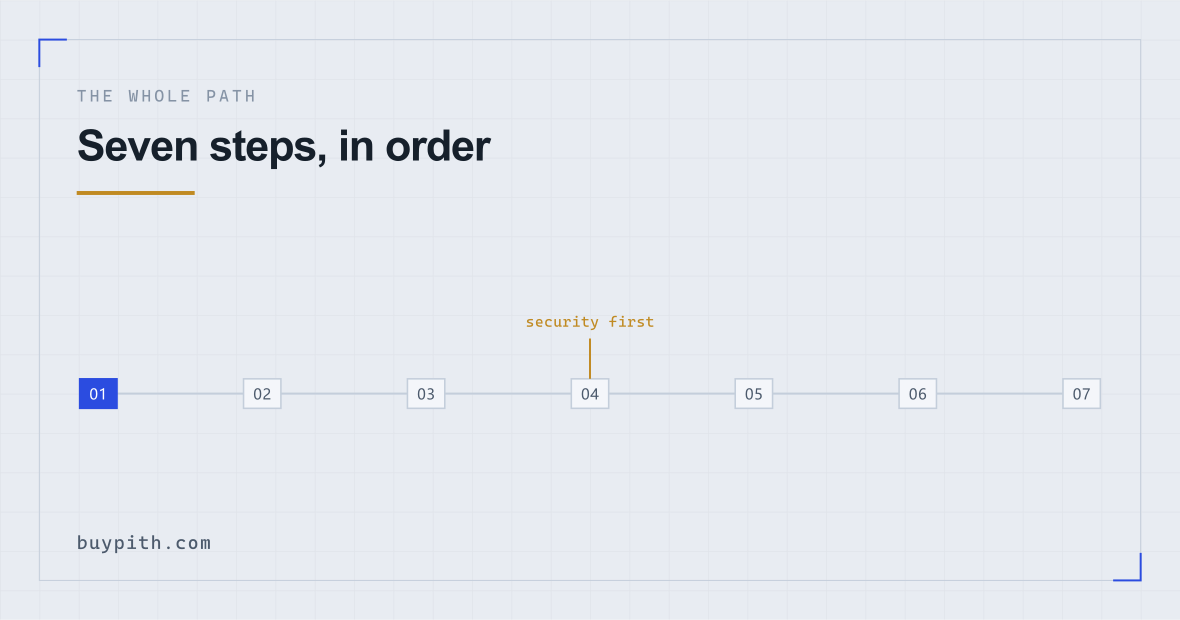
- 10 minSorting out what you need before you open a single tab: money you can leave alone, a phone you control, an email nobody else reads.
- 5 minThe sign-up form itself. Short. Nothing here is difficult.
- minutes–daysIdentity verification. This is the step with no fixed length.
- 10 minLocking the account down. Do this while it is still empty.
- instant–3 daysGetting money in. Card is minutes and expensive; a bank transfer is slower and much cheaper.
- 2 minPlacing the order. The irreversible part.
- —Understanding where the coins now are, which is not where most people assume.
There is a specific kind of frustration in this process that nobody warns you about. Not the difficulty — none of the individual steps are hard. It is that each screen assumes you have already met a concept that nobody introduced you to. A field appears asking for a “network”. A number appears next to your order that is not the price you just looked at. A verification screen says “processing” for two days with no indication of whether that is normal.
So this page does the whole thing in order, at the level of the screen in front of you. Where something varies by country or by month, it says so rather than inventing a number. And where a step is genuinely dull, it stays dull; the boring parts are where the money goes.
What to sort out before you touch a sign-up form
Four things, and none of them are on any exchange's checklist.
Money you can genuinely leave alone. Not “money I probably will not need” — money that can drop by half and sit there for two years without changing anything about your life. The amount question has a real answer and it is smaller than people expect, but the test is not the size of the number. It is whether you would be forced to sell at a bad moment. If you would, you are not buying an asset, you are taking a position with a deadline.
An email address you control and do not share. This becomes the recovery route for an account holding money. A shared family address, an old work address, or one you have not logged into for years are all bad choices for reasons that only become obvious later.
The phone you actually carry. Two-factor codes will live on it. If your plan is to set this up on a laptop and never think about the phone again, stop and read step 04 first.
Identity documents in a state that will pass. Not expired, matching the name you are about to type, and photographable without glare. This sounds like a formality, but a document that fails here stops everything after it — four fixable causes of rejection have their own page.
Decide the amount before you see any prices. Write it down. The order screen is designed to make adjusting that number frictionless, and the moment you are looking at a chart is the worst moment to be choosing a figure.
The sign-up screen itself
This part takes about five minutes and is the least interesting screen in the process. Email, password, sometimes a phone number, a checkbox for the terms, and a verification code sent to whichever of those you used.
Two fields deserve a comment.
The referral field. It is usually collapsed behind a small link reading something like Enter referral ID (optional), sitting under the password field or on a second screen. It takes a short code. Entering one does not create an obligation, does not link you to anyone's account, and does not let them see anything about you — under Binance's referral programme it pays the referrer a share of the fees you generate, part of which the referrer may choose to pass back to you; it sets no standing discount on your own fee rate. That share is how this site is funded, which is why we have one and why it is on our home page — the referral page shows the arithmetic. It can normally only be entered at sign-up, never afterwards, which is the only reason it is worth mentioning at this stage rather than later.
The password. Use a manager and generate something you could not remember if you tried. The failure mode here is not a hacker guessing it. It is reusing a password that leaked from an unrelated site three years ago and appears in a list that people run against exchanges automatically.
If your screen looks different: registration fields and their order can vary by region. A referral field may appear under an optional section or after contact verification. It is optional: continue without a code if you cannot find it, and rely on the offer actually shown rather than assuming a discount.
The account guide goes through this screen field by field, including what happens when the confirmation code does not arrive, which is common enough to be worth its own section.
Verification: what they look at
Now the part with no fixed length. Regulated platforms have to establish who you are before you can move real money, so you will be asked for a government document, a photograph of your face, and sometimes an address confirmation. This is not optional on any platform worth using, and the routes that avoid it are worse than they sound.
What the check is actually doing: reading the machine-readable strip on your document, comparing the photograph on it to the selfie, confirming the document is not a photograph of a screen, and running your name against sanctions and politically-exposed-person lists. Most of that is automated and finishes quickly. If any part scores badly, the case goes to a human queue, and human queues have no published length.
When the flow asks for a live document capture, photograph the physical document, not a copy displayed on another screen. If the flow offers an upload, follow its file requirements. A supported laptop webcam can also be used for face verification; Binance explicitly supports a smartphone or a computer webcam (reviewed October 2026). Follow the prompts for the device you choose.
Timing: fast approvals can come back before you have closed the tab. Slow ones can take days. Both are ordinary. What decides which one you get is mostly document type, country, and how busy the queue is — none of which you control, and all of which make any promised figure meaningless.
If it comes back rejected: that is a specific outcome with a specific reason attached, not a judgement about you. Read the message, fix the thing it names, resubmit. Repeated blind resubmissions are what turns a delay into a locked account.
Lock the account down before any money goes in
Here is where this guide diverges from most. Nearly every walkthrough puts security at the end, as a tidy afterword. By then the account holds money, and the gap between funding and hardening is exactly the window that gets exploited.
Do these while the balance is zero and the stakes are nothing:
- Authenticator-app two-factor, not SMS. Any authenticator app will do. SMS codes can be redirected by someone who convinces your mobile operator to move your number, which is an ordinary and well-documented attack rather than a theoretical one. If the platform allows both, set up the app and remove SMS as a second factor if you can.
- Save the 2FA recovery codes somewhere offline. A written note in a drawer beats a screenshot in your photo roll. Losing your phone without these turns into a support case measured in weeks.
- Set the anti-phishing code, if your exchange offers one. Binance's instructions (reviewed October 2026) say the code appears in genuine emails and SMS after it is enabled. A missing or incorrect code is a warning: open the app or type the site address yourself to check. A matching code is not permission to share passwords or move funds, and it does not authenticate a caller or a website.
- Turn on the withdrawal address whitelist. It means funds can only be sent to addresses you pre-approved, usually with a waiting period before a new one becomes usable. That delay is the point: it gives you time to notice.
Ten minutes, once. The post-purchase checklist repeats these for anyone who has already bought and skipped them.
Getting money into the account
Two realistic routes for a first purchase, and the difference between them is larger than it looks.
Card. Minutes, sometimes instant. It is also the most expensive route on almost every platform — you are paying the exchange's card-processing markup on top of everything else. On a small first purchase this can be a startling proportion of what you put in. Credit cards are worse again, because your card issuer may treat the transaction as a cash advance, which starts charging interest immediately and has its own separate fee.
Bank transfer. Slower — same day to a few working days depending on your country's payment rails — and much cheaper, often free to deposit. If you are not in a hurry, this is the route that leaves more of your money as bitcoin. The full comparison covers speed, cost, limits, and which one is more likely to be declined.
If the payment is declined: check the error message and ask your bank whether the payment was restricted. The bank, exchange or payment processor may be responsible. Repeatedly retrying will not fix a policy restriction; a different funding route can also be subject to checks.
Deposits arriving as a currency balance, not as crypto, is the expected state. You now have money sitting on an exchange, which you have not yet spent.
Placing the order
The screen offers at least two ways to buy, and the wording differs everywhere. Stripped of branding, there are two mechanics:
| What you press | What it does | What it costs you |
|---|---|---|
| Market (often “Buy now”, “Instant”, “Convert”) | Buys immediately at whatever the market is doing right now | Certainty of execution; you accept the current price and whatever spread is baked into it |
| Limit | Places an order that only fills at your price or better, and waits | Usually a lower fee tier; the risk is it never fills |
For a first small purchase, the simple option is defensible. The thing worth understanding is that the convenient one-click buy widget and the actual trading screen are often different products with different pricing on the same platform, and the convenient one usually costs more. Which to use, and what each trades away, is a page of its own.
You will also be asked how much — in your currency, or in bitcoin. Either is fine, and you are not buying a whole one. A bitcoin divides into 100 million units, and buying a few dollars' worth is completely ordinary.
Read the confirmation screen properly. It shows the amount, the fee, and the quantity you will receive. That third number is the one that matters and the one people skim. Then press the button, because this is where it stops being reversible — a filled order is not a card payment and there is nothing to dispute.
Typically a deposit or payment fee if your funding route had one, a trading fee taken by the platform, and a spread that never appears as a line item because it is inside the price you were quoted. If you later move the coins off the platform, a network fee applies as well. Which of these is visible and which is hidden is worth ten minutes before your second purchase, and the fee impact table shows how the proportion changes with the size of the buy.
Where your coins actually are
Your balance now shows a quantity of bitcoin. Here is the uncomfortable accuracy: that number is a record in the exchange's database saying they owe you that much. It is a claim on a company, not an asset sitting in your possession. This is not a fringe distinction — it is the whole reason the phrase “not your keys, not your coins” exists, and the reason people who kept balances on platforms that later failed did not get them back.
For a small first purchase, leaving it on a well-run platform is a normal choice and the one most people make. The point is to make it knowingly. What actually happens when you press withdraw, and what a wallet address is, sits on its own page — and if you look up a transaction afterwards on a public explorer like mempool.space, you can watch it confirm, which is the first moment this stops feeling abstract.
One practical thing, today rather than eventually: write down what you just did. Keep the date, amount in your currency, quantity received, fees and platform. Tax treatment depends on your jurisdiction. For a US example, the IRS digital-assets guidance (reviewed October 2026) distinguishes a purchase with ordinary currency from a later sale or exchange and explains the records needed to establish cost basis. Check your own tax authority's rules before applying that example elsewhere.
When a step refuses to go through
Four things stall first attempts, in roughly this order of frequency. None of them mean you have done anything wrong, and all of them have a specific fix rather than a general one.
The confirmation code never arrives
Check the spam folder first, then check that the address you typed is the one you think it is — a typo in a sign-up email is invisible because you never see the address again. If it is genuinely not arriving after a couple of attempts, the usual cause is your mail provider silently filtering it; adding the sender to your contacts and requesting a new code fixes it more often than anything else. Do not request twenty codes in a row. Each one invalidates the last, so a burst of requests means the one you eventually receive is the only valid one, and it is probably not the one you are typing.
Verification says “processing” and stays there
The honest answer is that you wait. There is no queue position to check and no way to escalate a case that has not failed. What you should not do is start a second application, submit a different document, or create a second account — all three make the case messier, and the third can get both accounts restricted. If it has been days rather than hours, a support ticket asking for a status is reasonable; a support ticket every day is not.
The card is declined
Ask the bank whether it declined the payment, then check the exchange's message if the bank says it approved it. A policy block will not disappear through retries, and some banks restrict transfers as well as cards. Confirm the permitted options before trying another route.
The deposit does not show up
Bank transfers can take anywhere from minutes on an instant rail to a few working days on an ordinary one, and weekends do not count on the slow ones. Before assuming something is wrong, check whether you included the reference the exchange gave you: a transfer that arrives without its reference has to be matched by hand, which is exactly the slow path you were trying to avoid. If it has been longer than the range the deposit screen quoted, the exchange's support has visibility that you do not, and your bank can confirm the money actually left.
Common thread: in every one of these, the instinct is to repeat the action. Repeating is what turns a delay into a flagged account. One attempt, then find out why.
What the first week usually looks like
The price will move, probably within hours, and you will feel something about it that is out of proportion to the amount. That reaction is the actual information from this exercise — it tells you what size position you can hold without it occupying your attention, which is worth more than any chart.
Two habits worth not forming: checking the balance repeatedly, and adding money because the price went up. The second one is the mechanism that turns a small experiment into a large one at exactly the wrong moment, and it is a well-worn way for first buyers to get hurt — the interface is designed to make it effortless.
If the answer after a week is “I did not enjoy any part of this”, that is a complete and legitimate result. You will have paid a few dollars in fees to find it out, which is a cheap way to learn something about yourself that a lot of people pay considerably more for.
Questions before you start
Do I need to buy a whole bitcoin?
No. A bitcoin divides into 100 million units, and exchanges let you buy a fraction of one. In practice the floor is set by a small minimum order value on the trading pair, not by the price of a whole coin — buying a few dollars' worth is completely normal.
Can I do all of this on a phone?
Yes, where the exchange and payment method are available to you. For face verification, Binance supports a smartphone or a computer with a webcam; use a supported flow and follow its prompts. The phone walkthrough covers the app stages.
What happens if my verification is rejected?
You get a reason, you fix that specific thing, and you resubmit. Rejection is not a ban. What does cause trouble is resubmitting the same failing document repeatedly without changing anything, which can lead to the account being restricted while a human reviews it.
Is my money safe on the exchange after I buy?
Your balance is a claim against the exchange rather than an asset in your own custody, and exchanges have failed before. Deposit-guarantee schemes that protect bank accounts in your country generally do not cover crypto balances. For small amounts most people accept that trade-off knowingly; the point is to know it.