Work out who refused before you retry
Card declined when buying crypto? Find out who said no
The error message is the same whether your bank refused, the approval step timed out, or the exchange rejected the card. Each has a different fix, and retrying blindly makes most of them worse.
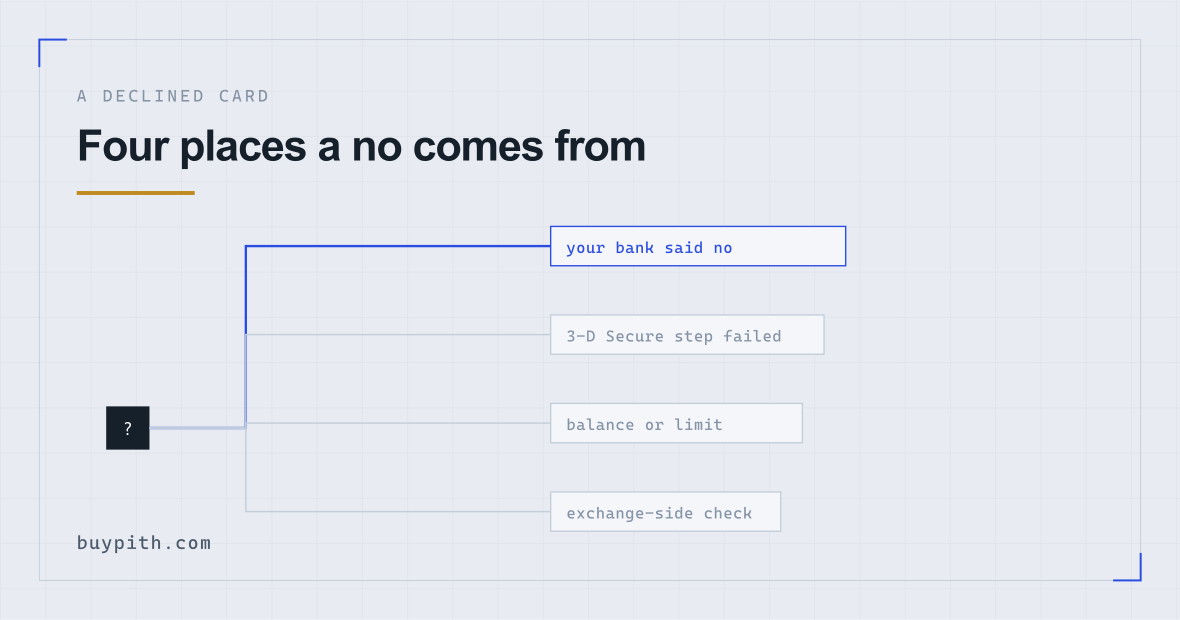
A declined card on an exchange feels like the exchange turned you down. Usually it did not. A card payment passes through several hands before any crypto is bought — your bank, the bank’s security check, the card network, the exchange’s payment processor — and any one of them can say no. The error on your screen is mostly the same whichever one refused.
So the useful question is not “why was I declined?” but “who declined me?”. The fix depends almost entirely on the answer.
Four places a no can come from
- Your card issuer’s rules. The bank looked at the payment and refused it: a blanket policy against crypto merchants, a fraud score that tipped over, or a temporary hold on the card.
- The 3-D Secure step. That is the extra approval your bank asks for — a code by text message, a push notification in the banking app, a fingerprint. If it times out or errors, the payment fails even though nobody actually refused it.
- Balance and limits. Not enough money on the card, or a daily limit for online or foreign payments set lower than the amount you tried.
- The exchange side. The card type or the country that issued it is not accepted for your account, or the purchase session has been locked after too many failed attempts.
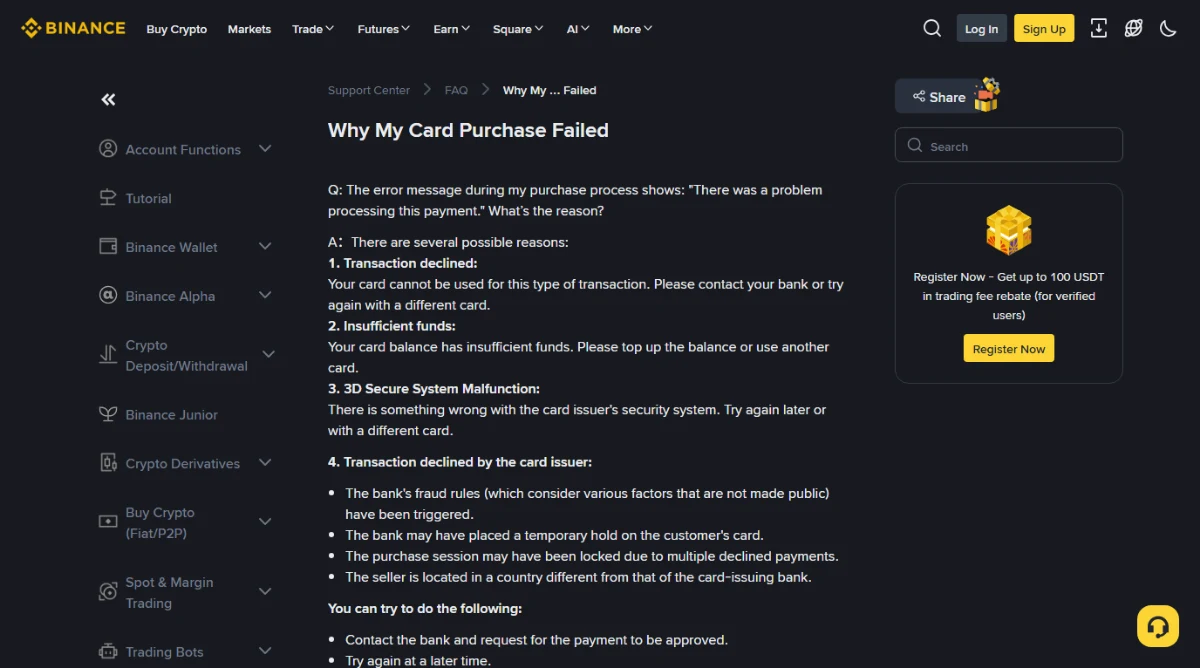
Binance’s own help page for this error lists causes that line up with these groups. Its generic message is “There was a problem processing this payment,” and the page behind it names declined transactions, insufficient funds, a 3-D Secure malfunction, and several ways the card issuer can refuse.
Match what you saw to the likely source
Wording differs between exchanges and even between app versions, so the left column describes what happened on screen. Find the row closest to yours.
| What you saw | Most likely source | First move |
|---|---|---|
| Declined straight away, no bank approval prompt appeared | Card issuer policy, or card type not accepted | Check the card is a type the exchange lists as accepted and in your own name, then ask the bank |
| Bank prompt appeared, you approved, then it still failed | Issuer fraud rules, or the processor after authentication | Wait, then call the bank before trying again |
| Bank prompt never arrived, or the page spun and returned an error | 3-D Secure step | Try later, keep the banking app open and signed in |
| “Insufficient funds” with money clearly on the card | Online or foreign-payment limit | Check the limits screen in your banking app |
| The card will not save at all, before any amount is entered | Exchange does not accept that card for your account | Use a different card or a bank transfer |
| Failed several times, now fails instantly | Session or card locked after repeated declines | Stop. Wait, and fix the cause before the next attempt |
When your bank said no
This is the case the exchange can see least of. What comes back from the issuer is typically a short decline code with no reasoning attached, which is why the exchange’s message stays vague. Binance’s page says as much: the bank’s fraud rules “consider various factors that are not made public.”
Two very different situations hide here, and a short call to the bank usually separates them:
- A fraud rule fired. A first payment to an exchange, in a foreign currency, for a round amount, from a new device — that pattern looks unusual to a bank that has never seen you do it. Many banks will confirm it is you and let the next attempt through.
- A policy refusal. Some issuers do not allow crypto purchases on their cards at all. No approval, retry or smaller amount gets past that; the card is simply the wrong tool.
When you call, ask two plain things: whether a payment to the exchange was declined on their side, and whether it was a security block or a policy on that type of merchant. If it is the first, ask them to allow it and wait a little before retrying. If it is the second, stop trying with that card.
Easy to miss: some banking apps show a declined card payment in the transaction list with a small “declined” or “blocked” label, and a few offer a “this was me” button right there. Check the app before you pick up the phone.
When the 3-D Secure step failed
On a phone this is where most of the friction is. The exchange app hands you over to your bank’s approval screen or sends a push to the banking app; you switch apps to approve; by the time you come back the exchange page has timed out, or the switch reloaded it.
What tends to help: have the banking app already open and signed in before you press the final button, approve promptly, and switch back without closing anything. If the code comes by text message and does not arrive, do not keep requesting new ones — each request can invalidate the previous code. If it fails the same way twice, try again later, since Binance’s own advice for a 3-D Secure malfunction is to retry later or use a different card. Doing the purchase in a desktop browser while approving on your phone avoids the app switching altogether, which is the route I would pick after one failed attempt on mobile.
Balance, limits and the card itself
“Insufficient funds” is taken literally by most people, but a card can have the money and still fail this check. Things worth looking at in your banking app:
- Online payments or foreign payments switched off. Exchanges are often billed from another country, so a card set to domestic-only can fail.
- A daily or per-payment limit for online spending, separate from your balance.
- The amount you entered versus the amount charged. The card is charged the purchase plus the card fee, and if the exchange bills in another currency your bank adds its conversion on top. A purchase that uses your whole balance fails on that difference. What fees am I actually paying goes through each of those layers.
The card itself matters too. Exchanges generally want a card in the same name as the verified account; a partner’s or parent’s card fails, even with their permission. Prepaid and virtual cards are accepted by some platforms and refused by others. Binance’s list also includes a cross-border case: the seller being located in a different country from the bank that issued your card. A card limited to domestic payments is the kind that can trip on it.
Why trying again and again backfires
Retrying the same card several times in a row. Every decline adds to the bank’s fraud picture, and Binance notes that the purchase session itself “may have been locked due to multiple declined payments.” After two failures, stop and find out which of the four sources you are dealing with.
Lowering the amount is the other reflex. It helps only when the cause was a limit. Against a fraud rule or a policy block it just adds another decline to the pile.
Money left your account but no crypto arrived
This is the part that worries people most, and it is usually not what it looks like.
When you pay by card, the bank first places an authorisation — a hold on the amount — before the payment actually settles. A failed purchase can leave that hold visible as a pending entry, so your available balance looks lower. The exchange does not keep that money. Your bank releases the hold on its own schedule, so the bank is also the one to ask how long it will take.
Check in this order:
- The exchange’s order history for card purchases. If the order shows as completed, the crypto is in your account — often in a different wallet or view than the one you are looking at. Where do my coins go explains where purchases land.
- The banking app entry. “Pending” means a hold. A settled charge with no completed order is the case to escalate.
- If it has settled and the order failed, open a support ticket with the exchange and include the order ID and the time. Asking the bank for a chargeback first tends to complicate things; what you can and cannot reverse covers why.
When to stop using the card
If the bank confirms a policy block, the card is closed to this use and that is the end of it. If you have hit the same failure three separate times on different days, the card route is costing more than it saves. A bank transfer is slower and less convenient, but it is also usually cheaper and does not ask your card issuer for permission. Debit card or bank transfer compares the two, and the payment method comparison lays speed, cost and failure points side by side.
One thing not to switch to: a credit card because the debit card failed. Issuers are often stricter with credit cards on crypto, and when one does go through it can be billed as a cash advance. The credit card question has the details.
Questions people actually ask
Does the exchange know why my bank declined the payment?
Rarely in any detail. What reaches the exchange is usually a brief decline code; the reasoning stays with your bank, so that is who to ask.
Can I use someone else's card if they say it is fine?
Exchanges generally require the card to be in the same name as the verified account, so it is likely to fail. Even where it goes through, a payment from a card that is not yours can lead to the account being reviewed.
Will a VPN help if my card was issued in another country?
No. A VPN only changes where your internet connection appears to come from. The country that issued the card, the country the payment is processed in and your bank's own rules all stay exactly as they were, and those are what a cross-border decline depends on. Signing in from a location that does not match your usual one can also add a security check on top.
My bank approved it on the phone. Why did the next try still fail?
The exchange side may still be holding a lock from the earlier declines, or the approval has not reached the bank's systems yet. Wait before retrying rather than going straight back in, and try once.